
Ever stared at a design tutorial and thought, “Wait, how’d they fit that image inside that shape?” That’s probably a clipping mask. It’s one of those tools that sounds way more complicated than it is.
Once you get it, you’ll wonder how you ever edited photos without it. This guide breaks down everything what a clipping mask is, how clipping masks work, when to use a clipping mask, and why clipping masks matter.
2. What Is a Clipping Mask?
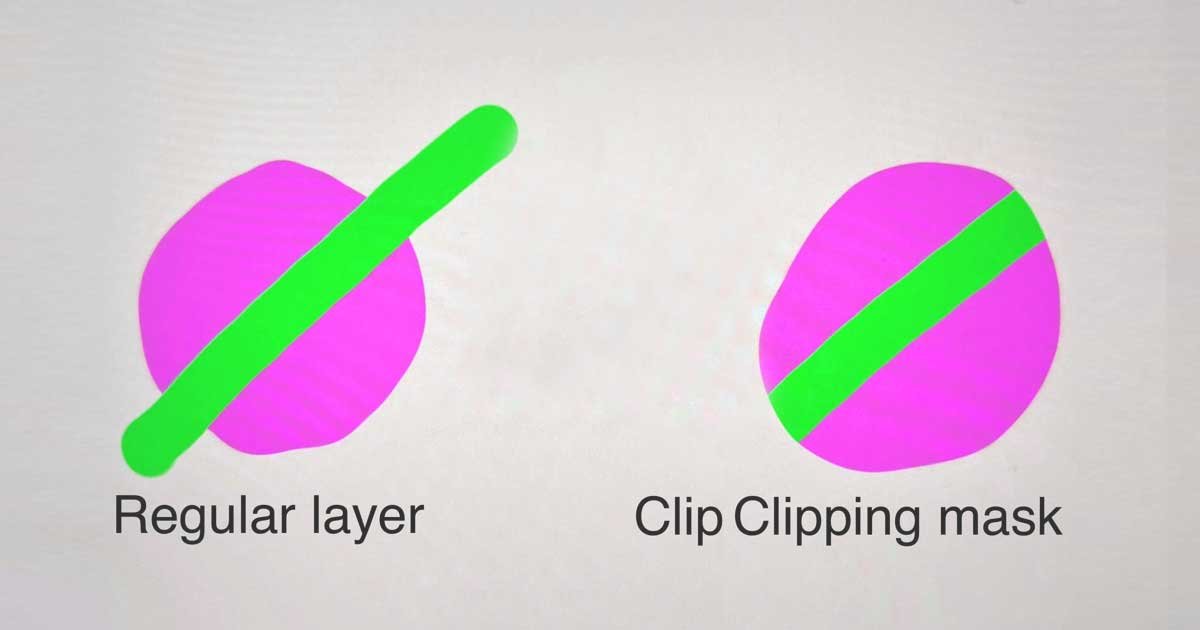
Simple Definition:- A clipping mask is like a window. You put an image behind a shape. The shape controls what you see. Everything outside? Hidden. Everything inside? Visible.
You’re not deleting pixels when you create a clipping mask. You’re just deciding which ones show up. Think of it like looking through a keyhole you see only what the hole reveals, but the whole room is still there. Understanding what a clipping mask is starts with this basic concept.
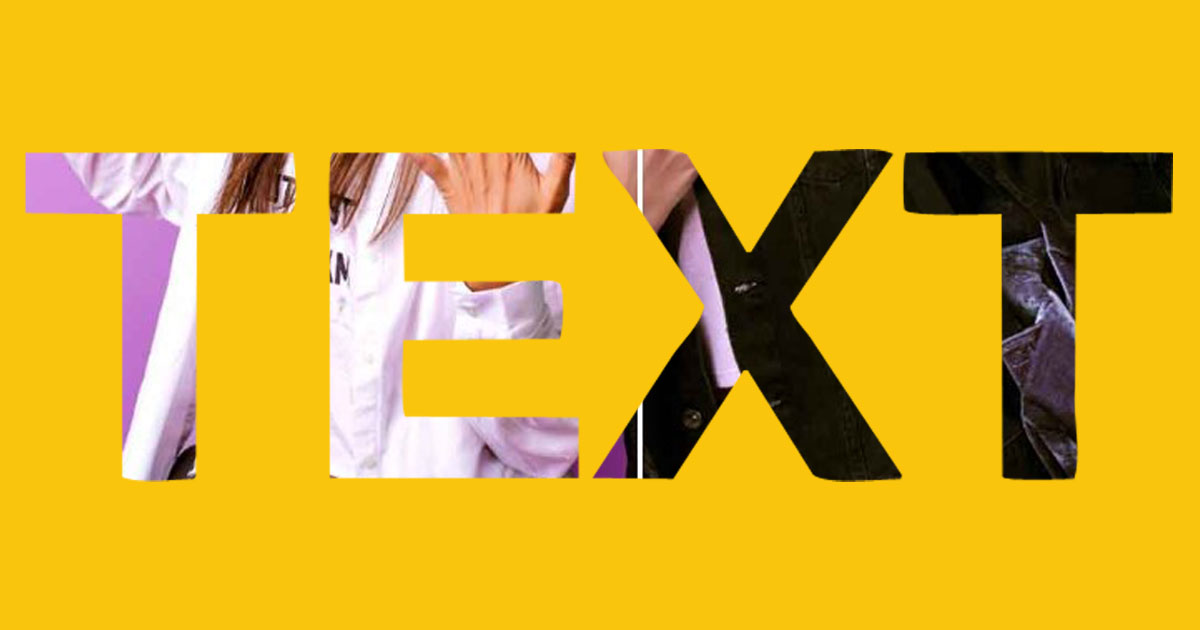
Technical Definition:-In layer-based editing software (Photoshop, Illustrator, etc.), a clipping mask is a relationship between two layers. The clipping mask definition centers on this layer interaction. The bottom layer is the “base.” It defines the visible area.
The top layer is the “clipped” layer. It shows only where the base layer exists. If the base layer has transparency, the clipped layer disappears there too. Understanding what is a layer clipping mask means knowing how these two layers communicate.
Think of it like this: the base layer is the cookie cutter. The clipped layer is the dough. You only see the cookie shape. This is the essence of what a mask or clipping mask does.
3. How Does a Clipping Mask Work?
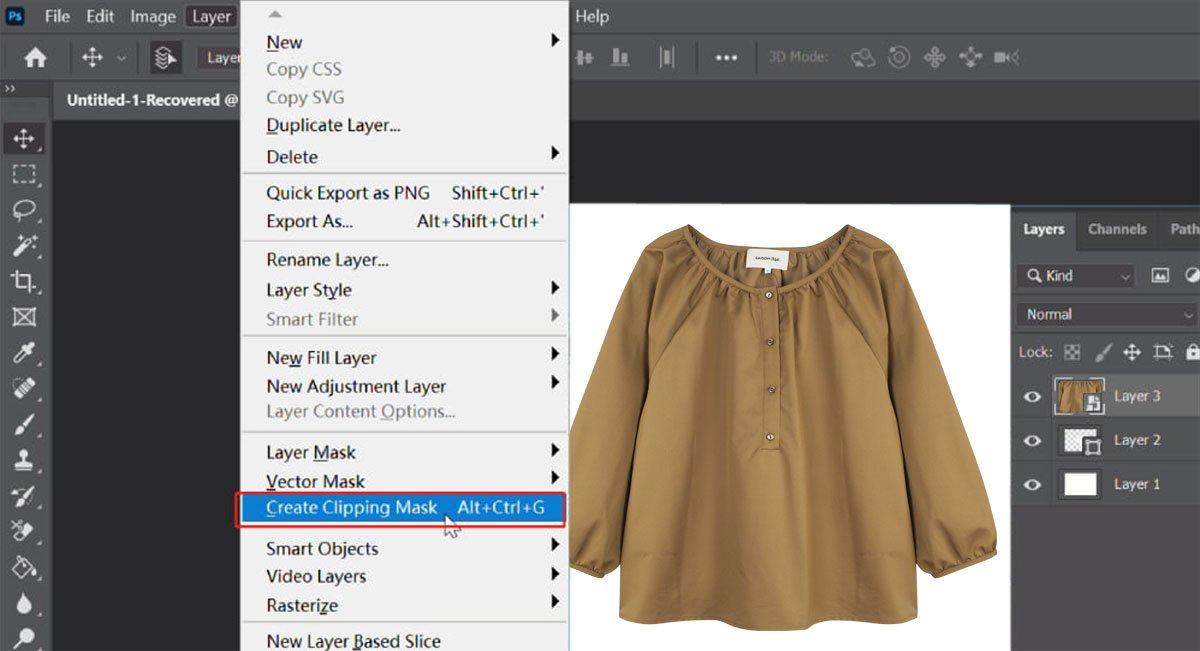
It’s all about layer relationships. One layer controls visibility. The other provides the content. Understanding how clipping masks work is crucial for mastering photo editing.
Layer Relationship Logic:-
Clipping masks work vertically in your layer stack. The layer you clip to sits below. The layer being clipped sits above. Photoshop checks: “Is there pixel data in the base layer at this spot?” If yes, show the clipped layer. If no, hide it.

Simple logic:-
Powerful control. When you photoshop clip layer operations, this logic applies every time. The photoshop clip to layer below function relies on this exact mechanism. Understanding how do clipping masks work helps you predict results before you even apply them.
Base Layer vs Clipped Layer:-
Base layer: This is your shape. Could be a circle, a logo, text, anything with defined edges. It’s the container that decides what gets seen. When you use clipping mask layer photoshop techniques, you’re controlling this relationship.
Clipped layer: This is your content. Photos, textures, gradients, adjustments. The stuff you want to show inside the container. Understanding what is clip masking in photoshop means recognizing how these two roles work together.
The base doesn’t change. The clipped layer just conforms to it. You can swap out the clipped layer anytime without touching the base. This is clip masking photoshop non-destructive containment at its finest.

Transparency Behavior
Here’s where it gets interesting. If your base layer has 50% opacity, the clipped layer inherits that. When working with clipping masks photoshop provides this transparency inheritance automatically.
If part of the base is fully transparent, the clipped layer vanishes there. This clipping mask photoshop definition includes transparency behavior as a core feature. The inheritance system makes clipping masks predictable.

Visibility Control Mechanics
You’re not erasing anything. You’re not using a selection tool. This is what does a clipping mask do in photoshop it controls visibility without destroying pixels. It’s non-destructive. Turn off the mask, everything’s still there.
Move the clipped layer around? The base stays put. The content shifts inside. Understanding what is a clipping mask on photoshop means appreciating this non-destructive power. What does a clipping mask do in photo editing? It preserves flexibility.
4. Step-By-Step Clipping Mask Workflow
Let’s make one right now. Learning how to create a clipping mask is easier than you think.
Create the Base Shape
Open Photoshop. Make a new document. Draw a shape could be a circle, a rectangle, custom vector path. This is your container. When you create clipping mask photoshop operations, this base shape is your foundation.
If you’re learning photoshop create clipping mask techniques, start with simple geometric shapes before moving to complex paths.
Place Image Above Base Layer
Import your image. Could be a photo, a texture, whatever. Drag it above the shape layer in the layer stack. Right now, it covers everything. That’s expected. Using clipping mask photoshop methods requires this layering first.
The clipping mask tool doesn’t exist as a separate tool it’s a layer relationship command you’ll apply next.
Apply Clipping Mask Command
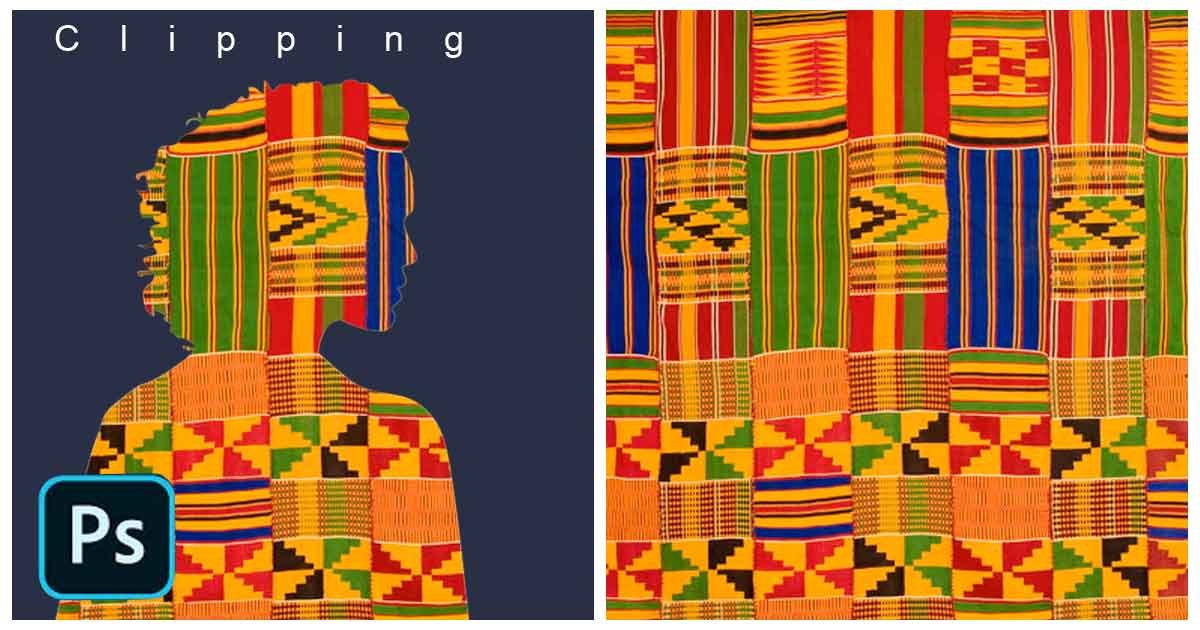
In Photoshop: Right-click the image layer → Create Clipping Mask. Or: Alt + Ctrl + G (Windows) / Option + Cmd + G (Mac). This is how to create a clipping mask in photoshop quickly. The image snaps into the shape instantly.
In Illustrator: Select both layers → Object → Clipping Mask → Make. If you’re learning how to create clipping mask in photoshop versus Illustrator, the concepts transfer. This is how to make a clipping mask in photoshop apply the command and watch the layers link together.

Adjust Mask Position and Scale
Your image is clipped. But maybe it’s not positioned right. Click the clipped layer. Move it. Scale it. Rotate it. When creating a clipping mask in photoshop, this adjustment phase is critical.
You’re editing content without touching the container. Understanding photoshop how to create clipping mask workflows includes this adjustment flexibility.

5. Purpose of Using a Clipping Mask
Understanding what is the purpose of using a clipping mask helps you know when to deploy this technique.
Image Containment
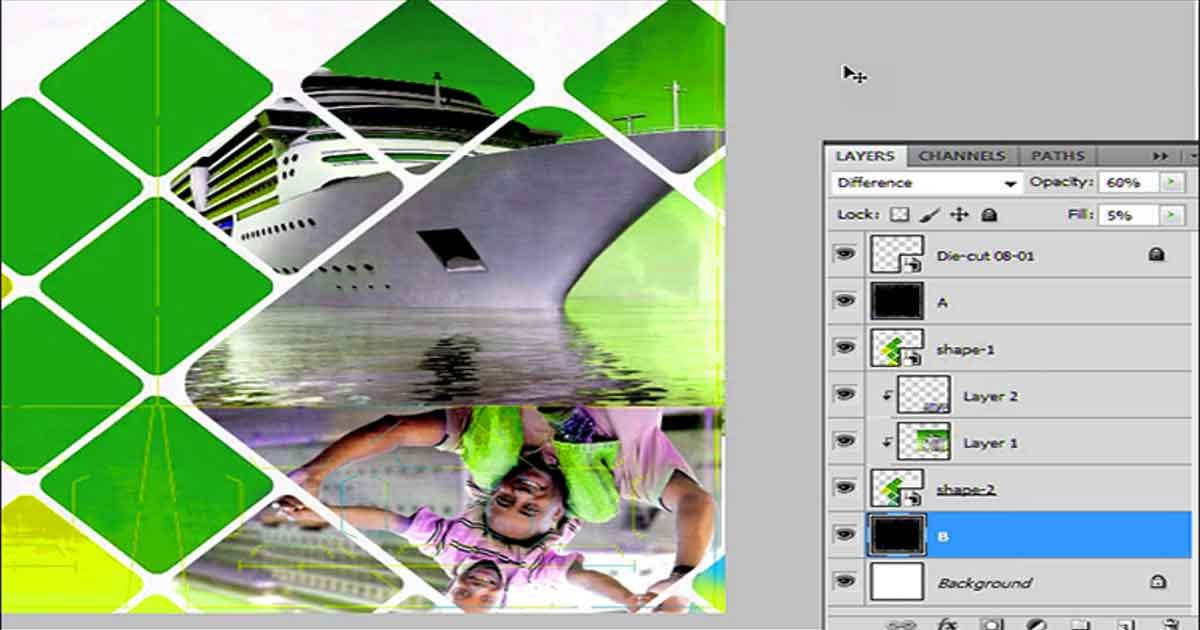
You want an image to fit inside a specific shape. A product photo inside a circle. A face inside a logo. A texture inside text. This is what is a clipping mask used for in most design scenarios. Clipping mask examples abound in modern graphic design.
Non-Destructive Editing
You’re not erasing pixels. You’re not making permanent changes. This is what is the purpose of a clipping mask in photoshop preservation. Swap the base layer? New shape, same content. A clipping mask photoshop workflow keeps your options open.
Selective Editing Control
Apply an adjustment layer as a clipping mask. Now it only affects the layer below it. A clipping mask tutorial would emphasize this selective control. Recolor a shirt without changing skin tones. Adobe photoshop clipping mask operations excel at targeted adjustments.
This selective editing capability makes color grading and retouching faster. Clipping mask digital art workflows rely heavily on this precision.

6. Advantages of Using Clipping Masks
Understanding the advantages of clipping masks helps justify learning them.

Non-Destructive Workflow
You never lose your original pixels. Unhappy with the result? Delete the mask. Start over. A clipping mask tutorial always emphasizes this safety net. Creating a clipping mask gives you freedom to explore.
Easy Revisions
Client wants the image shifted left? Move the clipped layer. Done. Want a different base shape? Swap it out. Clipping mask examples in professional work show constant iteration.
Composite Flexibility
Layer multiple clipping masks. Image clipped to a shape. Adjustment clipped to the image. Another image clipped to text. Clipping mask digital art projects often stack 10+ masks in one composition.
Precision Editing
Target specific areas with laser focus. No messy selections. No accidental edits. The clipping mask tool keeps your workflow tight and efficient.
7. Limitations of Clipping Masks
Even clipping masks photoshop users love have drawbacks.
Transparency Complexity
Nested clipping masks can get confusing. Multiple layers clipped to multiple bases? Stay organized. Name your layers. How does clipping mask work when you have five nested? Carefully.
Heavy Layer Files
Big projects = big files. Multiple high-res images clipped to multiple shapes? Your PSD bloats fast. Creating a clipping mask adds data to your file.
Software Compatibility
Clipping masks work great in Photoshop, Illustrator, Affinity Photo. But export to another format? Sometimes they flatten or break. An affinity photo clipping mask might not translate perfectly to other software.
Export Constraints
If you export as PNG or JPG, the mask flattens. That’s fine for final delivery. The clipping mask icon in your layers panel reminds you it’s active. Always maintain master files with intact clipping masks.
8. Real-World Uses of Clipping Masks
Clipping mask examples from real projects show the versatility.
Typography Masking
Filling text with an image? Type your text. Place an image above it. Clip. This is a classic text clipping mask technique. Clipping mask text photoshop tutorials focus heavily on this application.
Poster Design
Ever seen concert posters with wild composites? Mountains inside silhouettes. Galaxies inside portraits. An adobe illustrator clipping mask tutorial would showcase these techniques. Designers stack multiple clipped layers to create depth.
Social Media Creatives
Instagram stories. Facebook ads. Pinterest pins. Templates use clipping masks to swap images fast. A figma clipping mask works similarly to Photoshop’s version. Clipping mask figma workflows enable rapid iteration.
Branding Visuals
Logos with textured fills. Business cards with photo inserts. Clipping mask in adobe illustrator creates consistent brand assets. Corporate clients love this consistency.
Product Composites
E-commerce product photography loves this. Place a product shot inside a template. Many businesses outsource to a clipping mask service for volume work. This is where professional clipping mask services like Clipping Photo Experts make a difference.
Fashion Campaigns
Model photos layered with graphics. Fabric textures overlaid on apparel shots. Clipping mask digital art techniques dominate fashion editorial.
Background Composites
Swap backgrounds without masking every pixel manually. A photopea clipping mask works for this if you don’t have Photoshop. Real estate photography does this constantly.
Catalog Image Editing
Retailers editing thousands of product images? Templates with clipping masks speed things up. Clipping mask clip studio paint users appreciate this efficiency. We’ve handled catalogs with 4,000+ images using templated clipping mask workflows.
Magazine Layouts
Feature images fitting custom shapes. Clipping mask indesign operations are standard in editorial design. Clipping mask in indesign gives designers flexibility. An indesign clipping mask preserves the page structure.
Advertising Visuals
Composites for print ads. Digital banners. Video thumbnails. After effects clipping mask techniques extend this to motion graphics. Clipping mask premiere pro workflows bring this to video editing.
9. Clipping Mask vs Layer Mask
Understanding clipping mask vs layer mask distinctions is essential for choosing the right tool.
Structural Differences
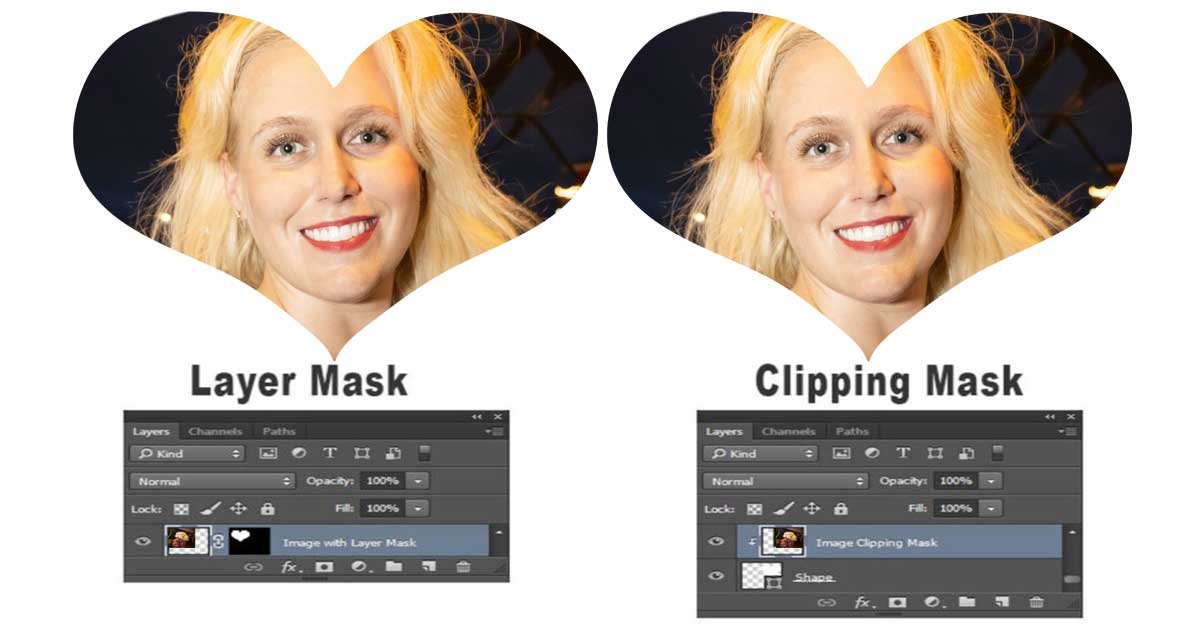
Clipping mask: Uses a layer’s shape to control visibility of another layer. Understanding what is a layer clipping mask requires knowing this structure. Layer mask: Uses a black-and-white mask attached to the same layer.
Clipping = layer-to-layer relationship. Layer mask = per-layer control. The layer mask vs clipping mask debate comes down to use case.
Editing Flexibility
Layer masks give you gradual transparency. Paint black to hide, white to reveal, gray for partial. Clipping masks are binary. Either the base layer exists or it doesn’t. Understanding mask vs clipping mask differences helps you pick the right approach.
Need a soft edge? Use a layer mask. Need a hard-edged shape? Clipping mask works great. Clipping masks photoshop provides consistent transparency inheritance.
Workflow Comparison
Layer masks are great for isolating subjects, blending edges, complex selections. Understanding how to use clipping masks in photoshop versus layer masks helps workflow decisions. Clipping masks are great for containment, compositing, adjustment targeting.
Use both. They’re teammates, not rivals. The best Photoshop artists combine them fluidly.
10. Clipping Mask vs Clipping Path
Understanding clipping path photoshop versus clipping masks prevents confusion.
Pixel vs Vector Masking
Clipping path: A vector outline. Clipping path in photoshop creates precise cutouts. Clipping mask: A layer relationship. Clip mask illustrator operations work similarly.
Paths are outlines. Masks are containers. Clipping path illustrator tools create vector boundaries. An illustrator clipping path is fundamentally different from a clipping mask.

Transparency Handling
Clipping paths don’t support transparency. They’re hard edges. How to clip mask in photoshop differs from how to use paths. Clipping masks can inherit transparency from the base layer.
This makes clipping paths perfect for clean product cutouts. Clipping masks perfect for creative compositing.

Commercial Use Cases
Clipping path service is huge in e-commerce. Remove backgrounds. Isolate products. This is what Clipping Photo Experts specialize in hand-drawn paths for Amazon, eBay, and retail catalogs. A professional clipping mask service handles both paths and masks.
Clipping masks are more about design compositing. Editorial. Branding. Social media. Different needs. Different solutions.
Need clean cutouts or soft transparent edges?
Send us 2–3 images and we’ll show whether clipping path or masking is the better fit for your files.

11. When Should You Use a Clipping Mask?
Knowing how to use clipping mask techniques means knowing when to deploy them.
Composite Editing
Layering multiple images? Clipping masks keep them organized. Understanding how to use a clipping mask in composite work is essential. Each element stays in its lane.
Color Adjustments
Want to adjust only one part of an image? Apply a Hue/Saturation layer. Clip it to the layer below. Knowing how to use clipping mask in photoshop for color work saves hours. Learning how to clipping mask in photoshop includes this adjustment technique.
Layout Containment
Need an image to fit a specific frame? Clipping mask. Done. Understanding how to use clipping mask in illustrator helps with layout work too.
Product Ad Creatives
Swap product images in ad templates. Knowing how to do a clipping mask in photoshop speeds up ad creation. Same ad framework, different products.
12. Troubleshooting Common Issues
Mask not working? Check layer order. This is the most common mistake when learning what is a clipping mask in photoshop.
Image not showing? Make sure the base layer has visible pixels. Understanding what is clipping mask in photoshop helps diagnose this.
Can’t create mask? You might be on a background layer. Convert it first. This is basic what is a clipping mask in photoshop troubleshooting.

Still stuck with a broken mask?
If your mask keeps turning white, disappearing, or losing edge detail, upload a few files. We’ll return a sample edit so you can compare workflow and quality on your own images.
13. Conclusion
Clipping masks are simple. But they unlock powerful, non-destructive workflows. Understanding what a clipping mask is opens doors to advanced editing. Whether you’re building product mockups, designing posters, or editing e-commerce images clipping masks save time.
You don’t need to be a Photoshop wizard. Just understand the concept: one layer controls visibility, another provides content. Mastering clipping masks transforms your editing workflow.
If you’re handling bulk editing projects catalog images, apparel photography, advertising composites this technique becomes invaluable. And if you’re outsourcing? Knowing how clipping masks work helps you communicate with your clipping mask service provider.
At Clipping Photo Experts, we handle thousands of clipping mask projects product photos, fashion edits, mockup templates all with hand-drawn precision. We’ve been doing this for 12 years. We’ve edited catalog shoots with 4,000+ images.
Need help scaling your editing workflow? We’ll do test edits in 45 minutes or less.
Get a free trial: Upload 2-3 images. We’ll turn them around in 45 minutes or less.
Contact us:
📧 sales@clippingphotoexperts.com
📞 +88 01981-449221
What is a clipping mask in Photoshop?
A clipping mask is a layer-based feature that lets one layer control the visibility of another. What is a clipping mask in photoshop comes down to layer relationships. The bottom layer defines the shape. The top layer provides the content. Only the content inside the shape shows up. It’s non-destructive, meaning you can adjust or remove the mask anytime.
How does a clipping mask work?
How does clipping mask work? It creates a relationship between two layers. How does a clipping mask work in practice? The clipped layer appears only where the base layer has visible pixels. Understanding how do clipping masks work helps you master the technique.
What is the purpose of a clipping mask?
What is the purpose of using a clipping mask? To contain images, textures, or adjustments inside a specific shape. What is the purpose of a clipping mask in photoshop? It’s non-destructive, flexible, and perfect for compositing and product photography.
Difference between clipping mask and layer mask?
Clipping mask vs layer mask what’s the difference? A clipping mask uses another layer’s shape to control visibility. Layer mask vs clipping mask shows that a layer mask uses a black-and-white mask attached to the same layer. Mask vs clipping mask comparisons reveal clipping masks are binary either visible or hidden.
When should you use a clipping mask?
How to use clipping mask techniques depends on your project. How to use a clipping mask applies when you need to fit images inside shapes, apply adjustments to specific layers, or build composite designs.
Is clipping mask better than clipping path?
Clipping path photoshop and clipping masks serve different purposes. Clipping path illustrator tools isolate subjects with vector outlines. Clipping masks control layer visibility. Both have their place.
What does a clipping mask do in photo editing?
What does a clipping mask do? It shows an image only inside a defined shape. What does clipping mask do in practice? You can move, scale, or swap the image without touching the container. What does a clipping mask do in photoshop specifically? Perfect for product photos and social media templates.

Shahidul Islam
Founder & Managing Director at Clipping Photo Experts
Helping photographers, brands, and ecommerce businesses create stunning visuals through professional photo editing, image masking, retouching, and post-production services. Passionate about sharing practical Photoshop and photography insights based on real-world experience.