Why Do I Look So Fat in Pictures? The Real Science + 8 Ways to Fix It

You felt good walking out the door. Then a friend tags you in a photo from last night.

At first you barely recognize the person in it. Wider face. Heavier arms. If you’ve ever thought why do I look so fat in pictures, you’re about to get the real answer.

Your stomach drops. You are not imagining this, and you are not alone.

I run a photo editing studio. My team opens thousands of portraits every month. The single most common note we get from clients is some version of the same sentence: I look fat in pictures and I don’t know why.

Here’s what I can tell you after years of looking at those files. That photo is not a neutral record of your body. It’s a flat copy of a round world, made by a small lens sitting far too close to you.

We grew up hearing the camera never lies. It does. Not on purpose, but it does.

Below is the real science behind why you look so fat in photos. Then eight fixes you can use on your very next shot. No diet. No filter. No app.

Quick answer: why do you look fat in pictures?

Your phone uses a wide angle lens, usually around 24mm, held close to your face. That creates perspective distortion, where whatever sits nearest the lens gets stretched wider while everything behind it shrinks.


Research in JAMA Facial Plastic Surgery found a selfie taken 12 inches away makes the base of your nose look about 30% wider than a photo shot from portrait distance. Add a low angle and flat overhead light and the effect stacks. It’s physics, not your weight.

Why Do I Look So Fat in Pictures? The Main Reasons

If you keep asking why do I look so fat in pictures, the answer starts with how a camera sees. Your eyes see you moving, in depth, from a distance you’re used to. A camera does none of that.

Instead, it freezes one moment. It looks with one small eye. It flattens depth the way a globe gets pressed into a paper map.

Five things do most of the damage.

By the numbers

  • A 12 inch selfie makes the nasal base look roughly 30% wider than a portrait distance shot (JAMA Facial Plastic Surgery, 2018)
  • That same distance makes the nose look about 6.4% longer and shifts the nose to chin ratio by 17% (UT Southwestern, 2022)
  • Short focal lengths stretched the midface by 12% to 19% in a 2023 study indexed on PubMed.
  • Blinded raters judged the same people as having a higher BMI when only the lighting angle moved (Aesthetic Plastic Surgery, 2021)

Lens distortion from wide angle cameras

Every phone ships with a wide angle lens. It has to. The maker wants your whole face in frame at arm’s length.

So wide lenses bend space near the edges. Photographers call that barrel distortion. Sitting on top of it is perspective distortion, which is the bigger villain here.

Perspective distortion is simple. Things closer to the lens project bigger. Things further back project smaller.

So yes, wide angle lenses do make you look fat. Your nose, cheeks, chest and stomach sit in the front row. They grow. Further back sit your ears and shoulders. They shrink.

This is also why people ask me why their head is too big for their body in a photo. Nothing changed about your head. It was simply closest to the glass.

Portrait photographers know this cold. That’s why they shoot at 85mm or 100mm. Those lenses flatten features in a kind way.

A 2016 study in PLOS ONE proved the point. Researchers photographed the same 45 people at 50mm, 85mm and 105mm. Nothing changed but the lens. Raters still judged the faces differently at every focal length.

Read that again. The lens alone changed how people saw them.

Even engineers at MIT and Google took this seriously. They built software just to undo wide angle selfie distortion. Nobody writes code to fix a problem that isn’t real.
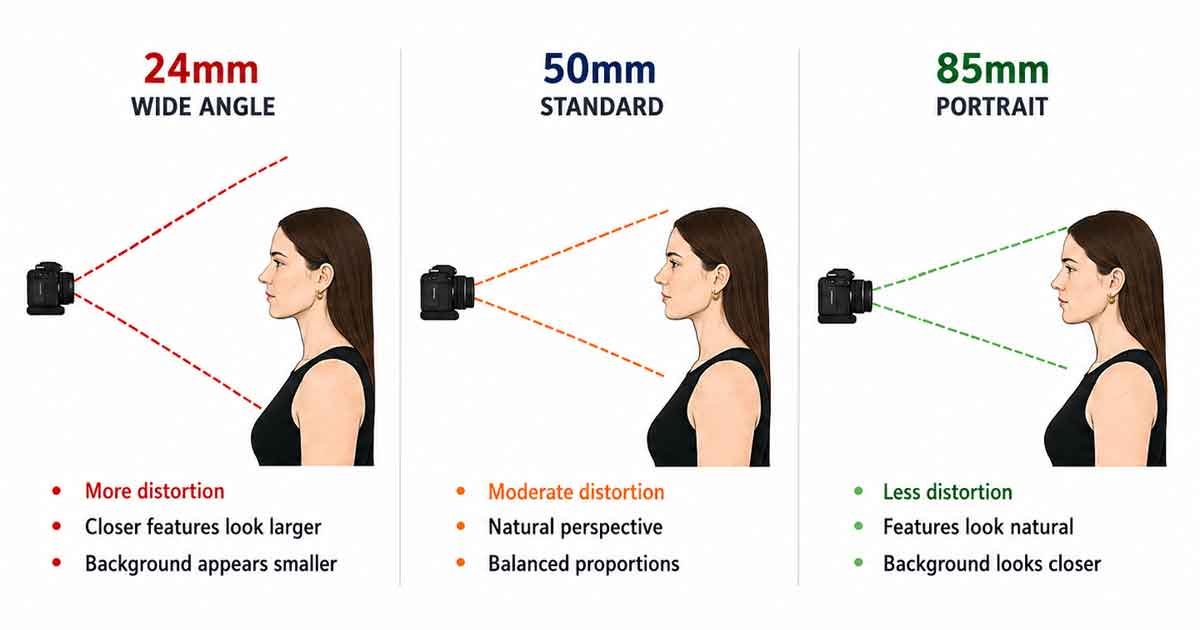
Diagram comparing 24mm, 50mm and 85mm lenses and their effect on facial perspective and proportion

Close proximity to the camera

In fact, distance matters more than the lens itself.

Hold your phone at arm’s length and your nose sits maybe 12 inches from the glass. Your ears sit six inches further back. That gap is enormous in relative terms.

But move back to five feet and the gap barely registers. Your proportions snap into place.

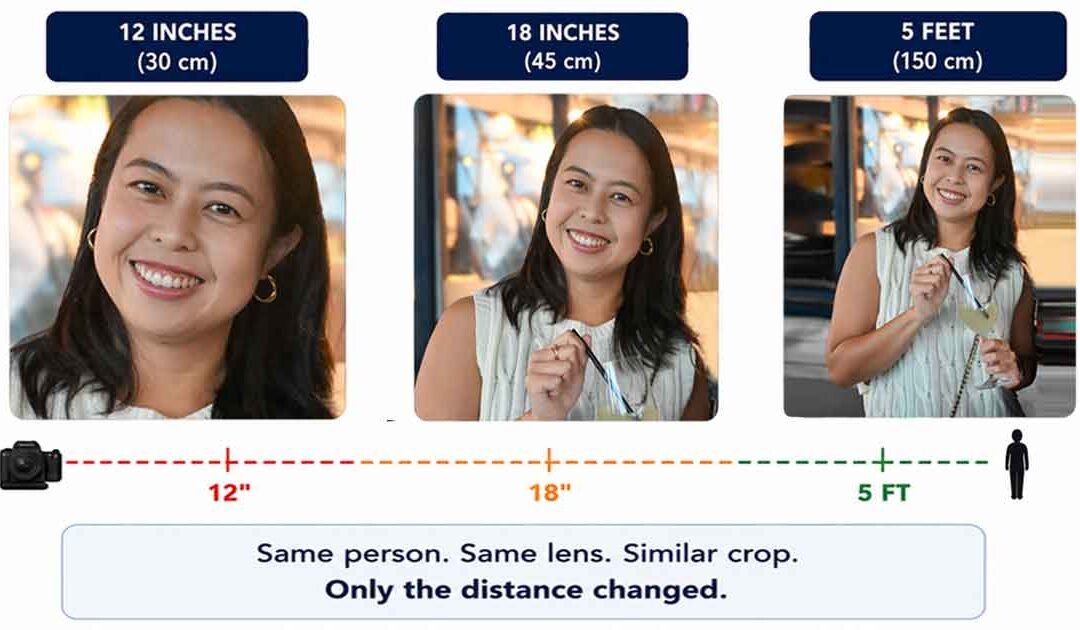
Researchers at UT Southwestern tested exactly this. They shot each person at 12 inches, 18 inches and five feet. The selfies distorted every single face.

So do phone cameras make you look fatter than a friend’s photo from across the room? Yes. Same you, same phone, different distance.

Here’s a bonus. A mirror doubles your distance for free. Light travels to the glass and back, so a mirror three feet away shows you from six.

Ever notice a ring camera makes me look fat is a real complaint people post online? Same cause. Doorbell cameras use ultra wide lenses and you stand right in front of them.
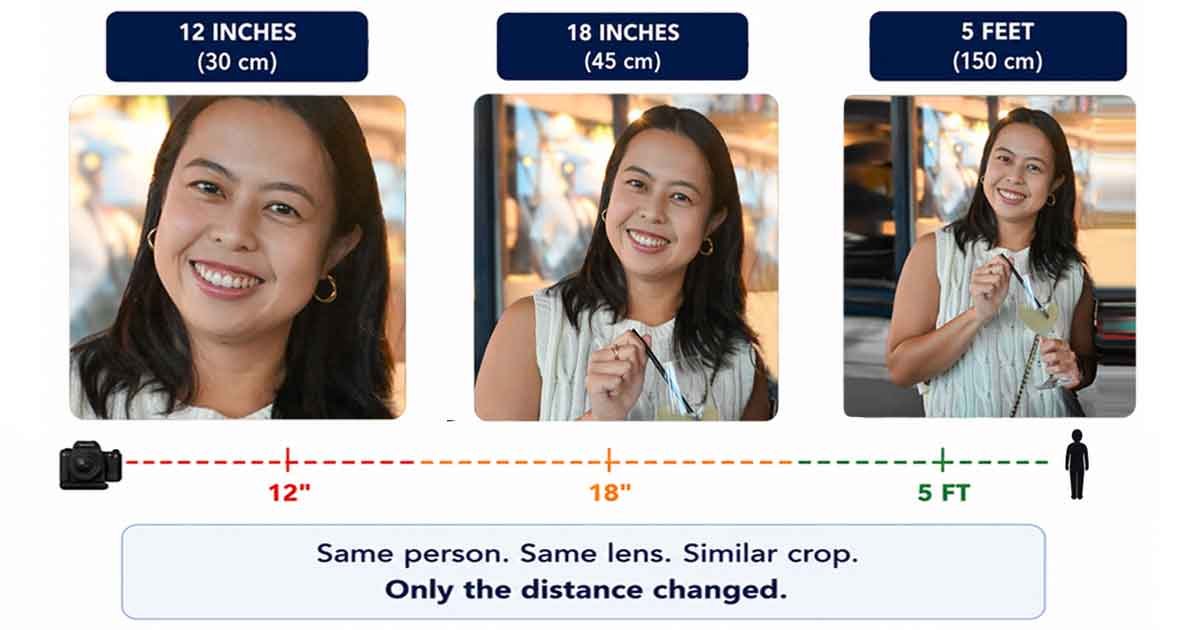
Same subject photographed at 12 inches, 18 inches and five feet to demonstrate perspective distortion

Why does my face look so fat in pictures?

Most people notice their face before anything else. There’s a reason for that.

Your face has the most depth variation of any part of you. Nose forward, ears back, chin below. When the lens sits close, that depth turns into stretch.

So when you ask why does my face look so fat in photos, the honest answer is that your face is not fat. It’s being projected wrong.

In short, the measured effects are specific. Nose wider. Nose longer. Chin visually shortened. Cheeks pushed outward. In extreme close ups the ears can nearly vanish.

That’s also why your face looks fat when you look down at the phone. The chin tucks, the jawline softens, and the lens exaggerates whatever is nearest, which is now your lower face.

Same reason your face looks longer on camera in some shots and wider in others. Tilt changes which feature leads.

And why does my face look fat when I smile? A smile widens the cheeks and lifts them toward the lens. At close range the camera magnifies that movement instead of recording it honestly.

Unflattering camera angles
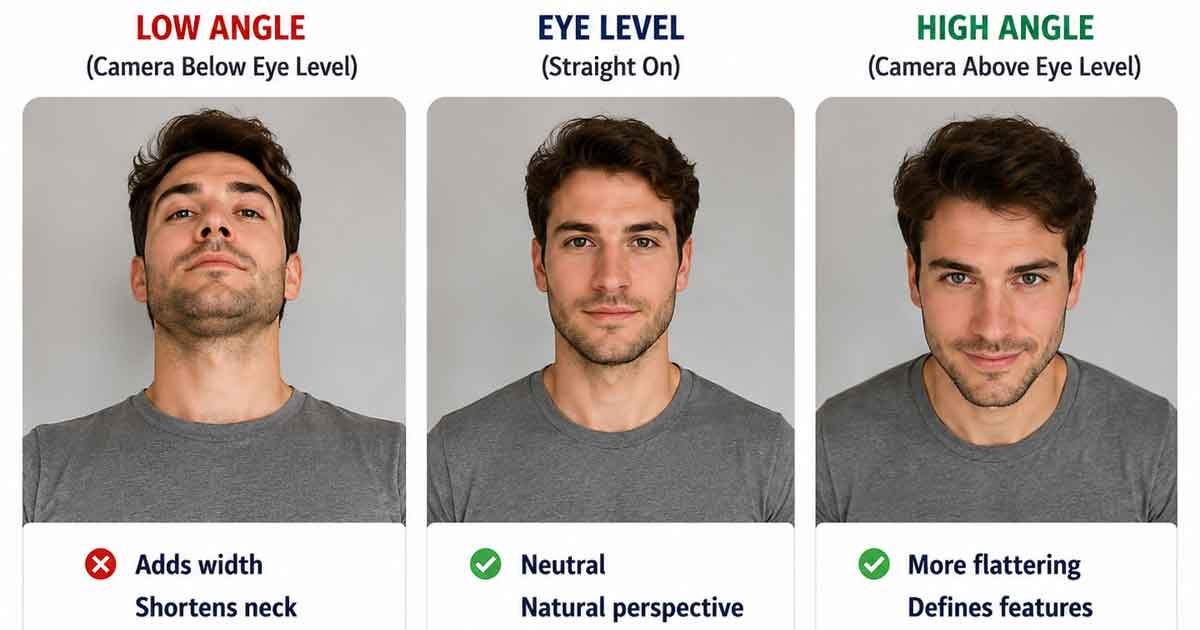
Camera height quietly decides how wide you look.
 
Shoot from below and the lens points up at your jaw. The chin softens. The lower body swells. The neck disappears.
 
Then straight on is the second trap. It kills depth completely. No shadow, no shape, just your widest possible outline pressed flat.
 
This is why your side profile looks fat in some photos and sharp in others. Turn slightly and everything changes.
 
That’s why models stand at 45 degrees. It isn’t vanity. It’s geometry.
Same person photographed from low, eye-level and high camera angles showing changes in facial appearance

Poor or harsh lighting

Shadows are what make round things look round. Take them away and your face reads as a flat disc.
 
Overhead office lights and midday sun do exactly that. So does direct flash. The light hits you head on and wipes out every contour.
 
Then the shadows land in the worst places. Right under the chin. Along the arms. Across the waist.
 
This isn’t a hunch. Researchers photographed 51 people at three lighting angles and had 27 blinded raters judge them. The perceived BMI rose significantly as the light angle climbed. Nothing about the people changed. Only the lamp moved.
 
If your face looks puffy in photos but fine in person, blame the light before you blame yourself.
 Same portrait under harsh overhead light and soft window light showing changes in shadows and facial depth

Clothing fit and appearance in photos

Baggy clothes read as body. The camera can’t tell where fabric ends and you begin.
 
Stiff material makes hard lines the lens exaggerates. Horizontal stripes widen you. Vertical lines stretch you taller, an effect known as the Helmholtz illusion.
 
Dark solid colors absorb light and tighten your outline. That’s the irradiation illusion doing the work.
 
Well fitted beats both loose and tight, every time.

Common Photography Mistakes That Affect Body Appearance

Most people make three of these at once without knowing. Sound familiar?

Taking selfies too close to the lens

Front cameras are the worst offenders. Widest lens on the phone, held closest to your face.
 
That combination is a funhouse mirror in your pocket. So when people tell me the iPhone camera makes me look fat, they’re right about the effect and wrong about the cause. It’s the distance, not the brand.
 
Quick fix: flip to the rear camera and step back.

Shooting from low or straight on angles

Handing your phone to someone shorter is a silent tax on every photo.
 
They shoot upward. Your torso compresses. Your legs shorten. Your arms merge into your sides.
 
Quick fix: ask for the camera at eye level or a few inches above.

Using harsh or direct lighting

Ceiling lights, car interiors and camera flash all flatten you.
 
They kill the shadows that define your jaw and waist. Then they add new shadows where you least want them.
 
Quick fix: find a window and face it. If you shoot indoors a lot, our guide on fixing harsh shadows in photos covers the rest.

How to Look Better in Photos

Now you know why it happens. Here’s how to fix it, starting with your next shot.

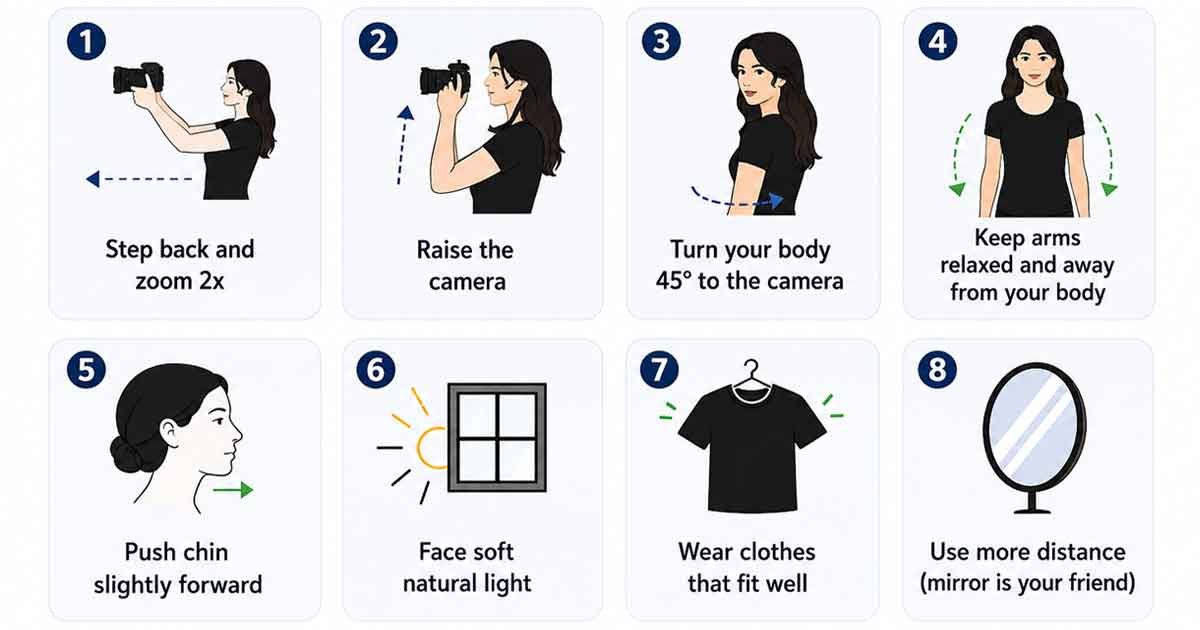
Tip What it does How to do it
1. Step back and zoom 2x Cuts wide angle stretch Rear camera, 2x zoom, move back 3 to 4 feet
2. Raise the camera Slims the jaw, lengthens the neck Lens 6 to 12 inches above eye level
3. Turn 45 degrees Narrows your outline Angle your feet away, twist shoulders back
4. Arms off your sides Stops the arm squish Hand on hip or a small gap at the elbow
5. Chin forward, then down Softens a double chin Push forehead out, then drop slightly
6. Face a window Adds shape with soft shadow Stand facing the light, never under it
7. Wear fitted, dark colors Tightens your silhouette Solid tones, structured fit, no baggy layers
8. Shoot a mirror selfie Doubles your distance Step back, photograph the reflection
Infographic showing eight camera, posing and lighting tips for more natural-looking photos

Step back and use slight zoom

This one fix does more than the other seven combined.
 
Switch to the rear camera. Tap 2x. Take three steps back.
 
You just moved your effective focal length out of the distortion zone. Same phone, same you, honest proportions.
 
If you only remember one thing about how to not look fat in pictures, remember this one.

Position the camera above eye level

Ever notice almost nobody takes a selfie from below? Your hands already figured this out.
 
A lens slightly above you stretches the neck and tightens the jawline. For full body shots, chest height works best.

Use flattering body poses

If you want to know how to pose to look thinner, it comes down to angles and space.
 
  • Stand at 45 degrees with one foot forward
  • Put your weight on the back leg
  • Let the front knee bend a little
  • Cross ankles at the calves, never at the thighs
  • Sitting? Perch on the front edge of the chair
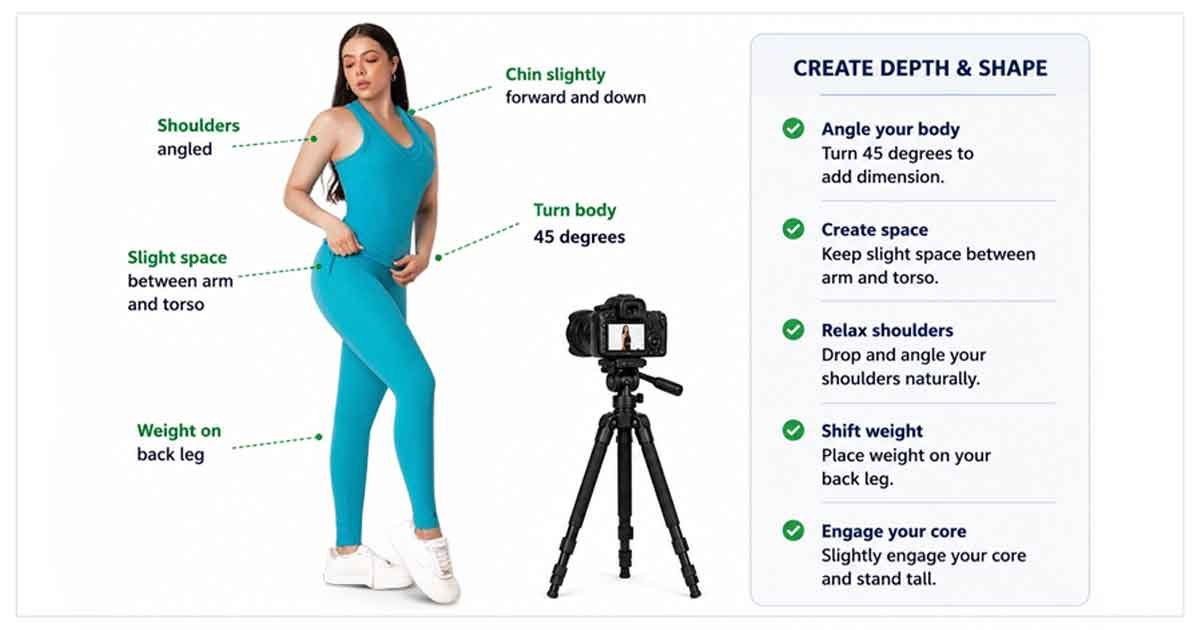
These poses to look slim work on every body. Flattering photo poses for plus size subjects follow the exact same rules. Create angles. Create gaps. Break up straight lines.
 
One more from the pros. Press your tongue to the roof of your mouth before the shutter fires. It quietly tightens everything under the chin.
 
That’s the short version of how to pose so you don’t look fat, and it takes about two seconds to set up.
Portrait posing guide showing a 45-degree turn, relaxed shoulders, arm space and weight on the back leg

Keep arms slightly away from the body

Arms pinned to your sides flatten against your torso. They spread. Then they merge with your body and your upper half doubles in width.
 
Still, a gap the size of your fist fixes it. Hand on hip. Elbow out. Hold a drink.
 
That’s why arms look fat in pictures even on very lean people. It’s pressure, not fat.

Use natural soft window light

Window light is the cheapest studio you’ll ever own.
 
Face the window and let the light land from the front or the side. Overcast days are even better. The clouds work like a giant softbox.
 
Golden hour, just after sunrise or before sunset, is the gold standard for full body shots.

Why You Look Different in the Mirror vs. a Photo

This is the question that stings most. You looked fine ten minutes ago. So why do you look fatter on camera than in the mirror?

Single lens vs. two eyes

Your phone has one small opening. It sees you from a single point in space.
 
You have two eyes set a few inches apart. Your brain blends both views into one image with real depth. You catch a sliver of each side of your face at the same time.
 
As a result, that extra information makes your face read as narrower. The camera never gets that second viewpoint.
 
So do mirrors make you look bigger? Not really. A mirror is closer to the truth because your own two eyes are doing the looking.
 
That said, mirror makes me look fat is also a real complaint. Cheap or slightly warped glass can bow your reflection, which is why you look fatter in some mirrors and fine in others.

Your face is the wrong way around in photos

You have spent your whole life looking at a flipped version of yourself.
 
Nobody’s face is perfectly even. One brow sits higher. One side of the smile pulls further. In the mirror you know that pattern by heart.
 
A photo un-flips it. Every small difference lands on the wrong side. Your brain flags it as off, and you read “off” as “bad.”
 
That’s a big part of why you look so different in pictures even when the lighting is good.
 
Try this. Hold a printed photo up to a mirror. If the reflection suddenly looks right, nothing is wrong with your face. You just met it from the other direction.

The mere exposure effect

Psychologists call it the mere exposure effect. We prefer whatever we see most.
 
It’s the same reason your own voice sounds wrong on a recording. Everyone else has always heard it that way. Only you are surprised.
 
Still, the cure is boring but it works. Take more photos in low stakes moments. Then look at them. The shock fades as your brain updates the file.

Does the Camera Really Add 10 Pounds?

Short answer, not literally. But the saying survived a century for a reason.

What the research actually says

No camera adds mass. It redistributes proportions.
 
The measured effects are real and specific. A 30% wider nasal base at selfie distance. A 17% shift in facial ratios. Up to 19% midface stretch at short focal lengths.
 
So stack those distortions across a whole body and you get the illusion of extra weight. That’s where the ten pounds live. In the geometry, not on you.
 
So is it true that the camera adds 10 pounds? The number is folklore. The effect behind it is measurable.
 
Old Hollywood coined the phrase back when short lenses and hot overhead lights were standard. Both add visual bulk. The nickname outlived the equipment.

Why phone cameras add the most visual weight

Do iPhone cameras add weight? Not weight. Width.
 
Front facing cameras on iPhone, Samsung and Pixel all use short, wide lenses around 24mm. You hold them inches from your face. That’s the worst possible setup for honest proportions.
 
The rear camera at 2x zoom is a different tool. Longer effective focal length, more distance, far less stretch. It’s also why the back camera makes me look fatter is rarely the complaint. It’s almost always the front one.
 
Same phone. Same person. One is a caricature, the other is a portrait.
 
The same physics explains why you look fat in videos too. Video usually shoots wide, and you sit closer to the lens than you would for a photo.

Am I Really as Fat as I Look in Pictures?

Let me answer the question you actually came here with.

No. The photo is not more honest than the mirror. It’s less honest.

The mirror shows you live, from two viewpoints, at double the distance, with real depth. The photo shows one flat frame from one small lens sitting far too close, lit by whatever happened to be overhead.

 
If you don’t feel fat but you look fat in pictures, that mismatch is doing exactly what the physics predicts.
 
Now the fair part. Because a camera can’t invent a body that isn’t there. It can widen, stretch and flatten what’s already there. Those are different things.
 
So am I as fat as I think I am? A single frame can’t answer that, and neither can a bad angle. Your clothes fit the same today as they did yesterday. That’s better data than one photo taken in a hallway at 9pm.
 
Judge the pattern, not the frame.

Social Media, AI Filters and Body Perception

There’s a second layer here, and it has nothing to do with lenses.

AI filters and the chubby filter backlash
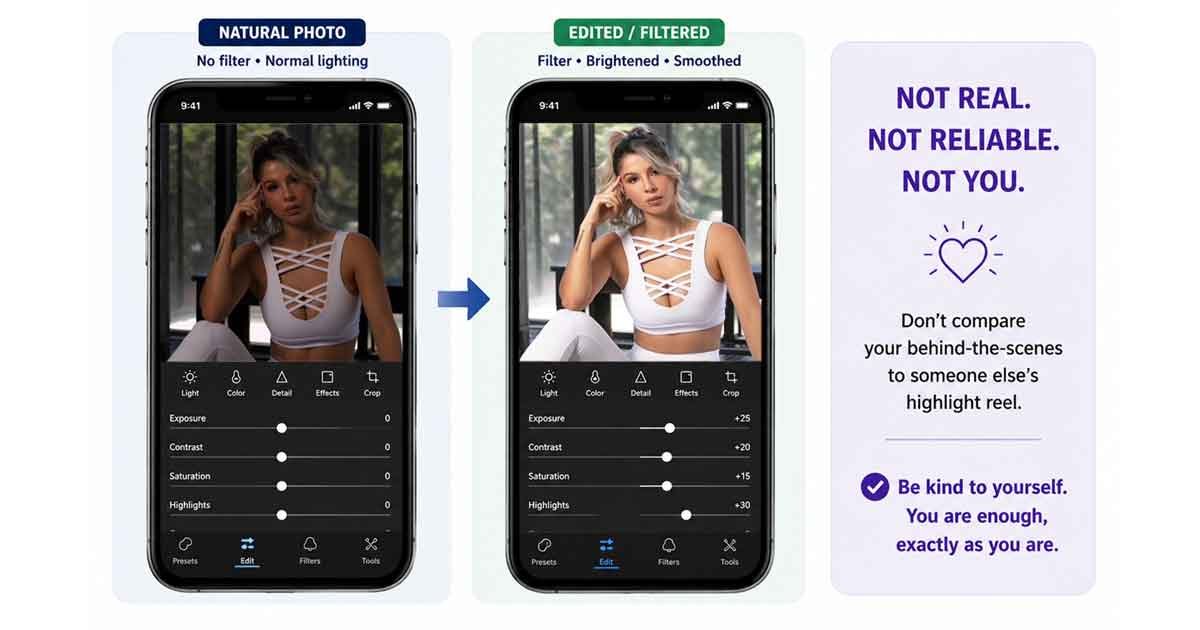
In March 2025, an AI “chubby filter” built in CapCut went viral on TikTok. It digitally added weight to whoever used it.
 
The backlash landed fast. Users called it cruel and warned it fed body shaming and eating disorder triggers. TikTok pulled the filter and limited videos using it.
 
That moment exposed something bigger. Every fat filter online, in either direction, trains us to compare ourselves to bodies that were never real, including edited versions of our own.
Natural portrait compared with a filtered social media version showing how editing affects body perception

Unrealistic beauty standards and selfie pressure

Surgeons noticed this shift years ago.
 
In its 2020 member survey, the American Academy of Facial Plastic and Reconstructive Surgery reported that 72% of members saw patients seeking procedures to look better in selfies, up 15% in a single year. A 2020 study in the Journal of Cosmetic Dermatology found selfie uploading raised the desire for cosmetic surgery.
 
Sit with that. People are booking surgery to correct distortion created by a lens.
 
Fixing your camera is cheaper. And reversible.
This matters more than any tip on this page. If comparing yourself to photos is affecting your mood, your eating or your daily life, please talk to someone. The National Alliance for Eating Disorders helpline is 1-866-662-1235. In the UK, contact Beat. In Australia, the Butterfly Foundation.

Body Dysmorphia, Weight Loss and Photo Shame

There’s a difference between disliking a photo and letting it rewrite how you see yourself. Most of us live in the first camp. Some of us slip into the second without noticing.

The feel fine, then see the photo cycle

The pattern is almost universal. You feel good. You see a photo. Shame lands. You promise to change. Repeat.
 
Naming that loop takes some of its power away.
 
One bad frame is not a verdict. It’s a fraction of a second, caught by a distorting lens, under whatever light happened to be there.

Why your brain lags behind your body

Does body dysmorphia affect photos? It can work in both directions.
 
People often say that after losing real weight they still see the old body in every picture. The mental image updates slower than the physical one. That’s also why some people see themselves as fat when nobody else does.
 
Trust the boring evidence instead. How clothes fit. Measurements. What people who love you actually say.
 
One photo is not data.

Frequently Asked Questions

Does the camera add 10 pounds?

Not literally. Wide angle lenses and short shooting distance stretch whatever sits closest to the lens, so your proportions widen. A 12 inch selfie can make the nasal base look about 30% wider than a portrait distance shot. Step back, zoom to 2x, and most of it disappears.

Why do I look fat in pictures but not in the mirror?

A mirror shows you live, in 3D, reversed, from a familiar angle, and you adjust without noticing. A photo flattens depth, freezes one moment and un-flips your face. Both are imperfect. The mirror is simply the version you know.

Why does my face look fat in pictures?

Your face has the most depth of any body part. Nose forward, ears back. At close range the lens magnifies whatever leads, so cheeks and nose widen while the chin shortens. Distance fixes it faster than any pose.

What camera angle is most flattering?

Slightly above eye level, roughly 6 to 12 inches higher. It lengthens the neck and sharpens the jawline. For full body shots keep the lens at chest height and turn your body 45 degrees. Never shoot from below.

Do phone cameras distort your face more than rear cameras?

Yes. Front cameras use wider lenses and you hold them closer, which doubles the effect. The rear camera at 2x zoom, taken from three or four feet back, gives a far more accurate result on iPhone, Samsung and Pixel alike.

Why do I look so wide from the side in photos?

A straight side shot taken close removes depth entirely, so your outline reads at its widest. Turn slightly toward the camera, drop the shoulder nearest the lens, and have the photographer step back three feet.

What does photo slimming mean?

Photo slimming means adjusting how a person’s shape reads in an image, either in camera through distance, angle, lighting and posing, or afterwards through subtle retouching. Done well it corrects lens distortion. Done badly it looks fake.

Why do I look skinnier in pictures sometimes?

Same physics working in your favor. A longer lens, more distance, a raised camera and side lighting all narrow your outline. That’s why one photo flatters you and the next one doesn’t, even on the same day.

How do I look thinner in photos without editing?

Turn 45 degrees. Shift your weight to the back leg. Keep arms away from your sides. Chin forward then slightly down. Camera above eye level. Rear camera at 2x from a few feet back. Soft window light. Fitted, solid, darker clothing.

It’s the Camera, Not You

Four things create the illusion. Lens width. Shooting distance. Camera angle. Flat lighting.
 
Three fixes undo most of it. Step back and zoom. Raise the camera. Face a window.
 
That’s it. No new body required.
 
But if you shoot at volume, the math changes. Photographers, online sellers and apparel brands hit this every day. Model shots that looked perfect on set come back with stretched silhouettes and hard chin shadows.
 
That’s fixable in post, and it should always stay realistic. My team handles natural body and double chin retouching by hand, with one goal. The image should look like the real person who showed up that day.
 
Want to test it on your own files? Send a few images for a free trial, or reach us at sales@clippingphotoexperts.com or +88 01981-449221.
 
One last thing. Next time a photo makes you flinch, check the lens before you question the body. Nine times out of ten, the camera is the one telling the story wrong.
 
Found this useful? Send it to someone who needs to hear it.
shahidul-islam

Shahidul Islam

Founder & Managing Director at Clipping Photo Experts

Helping photographers, brands, and ecommerce businesses create stunning visuals through professional photo editing, image masking, retouching, and post-production services. Passionate about sharing practical Photoshop and photography insights based on real-world experience.